The modern business workplace has undergone tremendous transformations, one of it is remote working. Workers use the internet to log into organizational systems, applications, and sensitive information from their homes, airports, hotels, co-working space and in a way that gives them more flexibility. However, the challenges presented by cybersecurity cannot be overlooked. Cybercriminals have developed means of targeting remote workers via phishing, unsecured wireless internet networks, weak passwords, compromised devices, and social engineering techniques.
Failure of an organization to secure remote working leaves the organization exposed to risks of data breaches, ransomware, and financial losses due to the actions of individual workers. The enormity of the problem has been highlighted by different reports that indicate how remote working has increased the size of the attack surface.
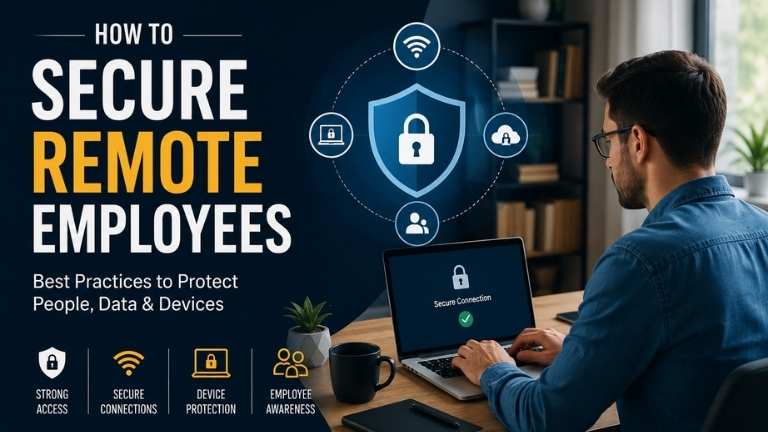
To secure remote workers, an organization should adopt a proactive security strategy. The security measures should go beyond the use of physical hardware such as laptops and VPN.
What is Remote Employee Security?
Remote employee security implies policies and technologies that companies adopt so as to protect workers, devices, network as well as the data of the company when they work from their own offices.
The main aim of achieving remote employee security is to make sure that employees can safely access company resources and not in any way increase the security threats to the company.
Remote employee security consists of the following services:
- Secure remote access;
- Identity and access management;
- VPN technology;
- Two-factor authentication (2FA);
- Data encryption;
- Employee awareness and training;
- Monitoring on a 24/7 basis.
Why Securing Remote Employees is Important
There are several good reasons why the security of remote workers should be taken seriously:
- It protects confidential data.
- It prevents unauthorized access to company networks.
- It minimizes the risks of ransomware and phishing.
- It helps ensure compliance with regulations.
- It maintains business continuity.
- It protects customer data.
- It improves employee efficiency.
- It sustains the good reputation of the company.
Common Cybersecurity Threats for Remote Employees
1. Phishing Attackers
Bad guys send forged emails/messages to deceive workers into giving information, e.g., their passwords or downloading viruses.
- Ways to prevent phishing attacks
- Confirm identity of senders,
- Never click suspicious links,
- Report suspicious emails.
2. Open Wi-Fi Networks
Open Wi-Fi networks lack proper security, making them prime hunting grounds for criminals to intercept.
- Ways to prevent phishing attacks
- Use only secure networks at home,
- Avoid using public Wi-Fi in your work,
- Connect through a secured VPN.
3. Weak Passwords
Weak passwords are not complicated and easily hacked by cybercriminals.
- Ways to prevent phishing attacks
- Always set up strong password,
- Use password managers,
- Change stolen passwords.
4. Lost/Stolen Devices
As remote workers travel, they may find themselves losing their devices.
- Ways to prevent phishing attacks
- Use devices with encryption,
- Have password protection,
- Possess information about information wipes.
5. Malware/Ransomware
Users accidentally download malicious software, without even realizing it.
- Ways to prevent phishing attacks
- Always have antivirus software installed,
- Keep one’s system current.
6. Shadow IT
Workers bypassing the company security systems to access unauthorized applications.
- Ways to prevent phishing attacks
- Provide proper tools and places to work,
- Observe use of unauthorized applications.
Best Practices to Secure Remote Employees
1. Multi-Factor Authentication (MFA) Solution
MFA offers enhanced protection through an additional verification process along with the password verification process.
Advantages:
- Helps in preventing unauthorized admissions
- Lowers the chances of losing the credentials
- Provides high-level security for the account
2. Zero Trust Security
Zero Trust presumes that none of the users or devices can be trusted automatically. The access request must be verified before providing access.
Advantages:
- Restricts lateral movement
- Provides protection from sensitive data
- Takes care of insider threats
3. Endpoint Security Implementation
Each employee device must be equipped with the latest antivirus file, malware protection, firewall solution, and endpoint detection solutions.
4. Device Updates
The use of periodic software updates removes known vulnerabilities before malicious Hackers can take advantage of them.
- Employees should:
- Allow automatic updates
- Use the security patches effectively
- Uninstall outdated software
5. Network Security
Employees must be motivated to:
- Change the default router passwords.
- Opt for WPA2 or WPA3 encryption.
- Take note of the router firmware.
- Disable unnecessary components.
6. Encryption of Sensitive Data
Encryption ensures the safety of the information, even if the devices are misaligned or compromised.
Companies are supposed to encrypt:
- Devices
- Cell phones
- Emails
- Cloud storage
- Data transfers
7. Cybersecurity Awareness Training
Employees can be the first line of defense against any attacks from cybersecurity.
Training must involve:
- Recognizing phishing
- Password management
- Browsing with caution
- Handling of data
- Social engineering attacks
- Incident reporting
8. Secure Tools for Collaboration
The collaboration platform you choose must offer business quality protection, with:
- End-to-end encryption
- Proper access controls
- Secure file sharing
Future Trends in Remote Employee Security
As cyber threats keep changing, organizations are kinda forced into adopting more and more of these things, honestly:
AI-powered threat detection, passwordless authentication, plus a Zero Trust Architecture style approach
Behavioral analytics and Secure Access Service Edge, (SASE)
Biometric authentication, and also “continuous authentication” as in always checking
Cloud-native security platforms, that kind of covers the whole scene
Overall these solutions help organizations remain one step ahead of the next emerging cyber threats, while still keeping work arrangements flexible, like remote or hybrid without too much friction.
Conclusion
Making remote work secure is no longer “optional” , it’s a crucial part of modern cybersecurity. Since remote and hybrid models keep expanding, companies really need to safeguard employees , the devices they use, the apps in daily use, and any sensitive information from cyber criminals who are getting even more clever and persistent. With solid multi step authentication, strong endpoint defenses, Zero Trust approaches, focused employee guidance, encryption, and ongoing surveillance, organizations can lower security exposure a lot while still letting people work safely from anywhere, without the usual anxiety.
Taking a proactive stance on remote employee security not only helps protect important corporate assets but also strengthens customer confidence, backs regulatory obligations, and improves long term durability for the business in this more and more digital world.
FAQ
1. What is remote employee security, you know like the whole “working outside the office” protection thing?
Remote employee security refers to the measures organizations use to shield employees, devices, networks , and business data when staff is working outside the office.
2. Why is securing remote employees important?
It helps stop cyberattacks, guards private information, supports compliance requirements, and keeps business continuity steady.
3. What are the biggest security risks for remote workers?
Typical risks include phishing schemes, weak passwords, unprotected Wi‑Fi, malware,lost or missing devices, plus unauthorized access to systems or folders.
4. How does Multi-Factor Authentication (MFA) improve security?
MFA makes users confirm their identity using more than one authentication approach, which makes it a lot tougher for attackers to break into accounts.
5. What is Zero Trust Security?
Zero Trust is a security style where every user and device is continuously checked before being allowed to reach company resources.
6. Should remote employees use a VPN?
Yes, basically. A VPN encrypts internet traffic and creates a safer pathway, especially if someone is connected outside of trusted networks.
7. How often should employees receive cybersecurity training?
At minimum annually, organizations should run cybersecurity awareness training, plus ongoing updates and simulated phishing attempts.
8. What should employees do if they suspect a cyberattack?
They should quickly disconnect from the network if company policy says so, report it right away to the IT or security team, avoid clicking or interacting further with the suspicious material, and then follow the organization’s incident response procedures.
ALSO READ
Why Government Organizations Choose Seqrite
Top 10 Cyber Security Mistakes Companies Make
Benefits of Choosing a Seqrite Platinum Partner
Top Cyber Security Threats Indian Businesses Face in 2026